

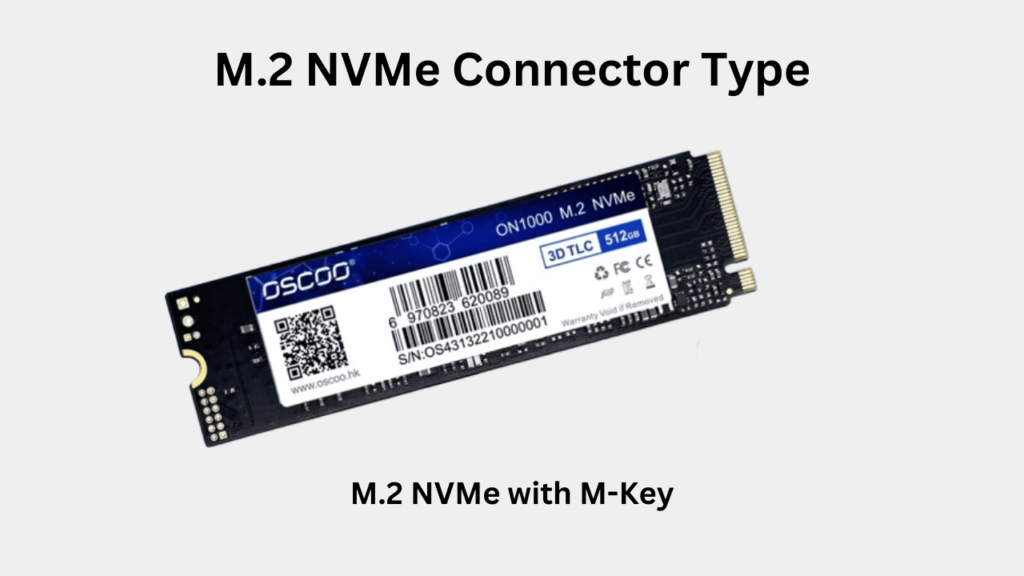
M.2 form factor 5 main size variations which are as follows:
2230: 22 mm wide, 30 mm long.
2242: 22 mm wide, 42 mm long.
2260: 22 mm wide, 60 mm long.
2280: 22 mm wide, 80 mm long (the most common size of M.2 SSDs).
22110: 22 mm wide, 110 mm long (used in large storage SSDs)
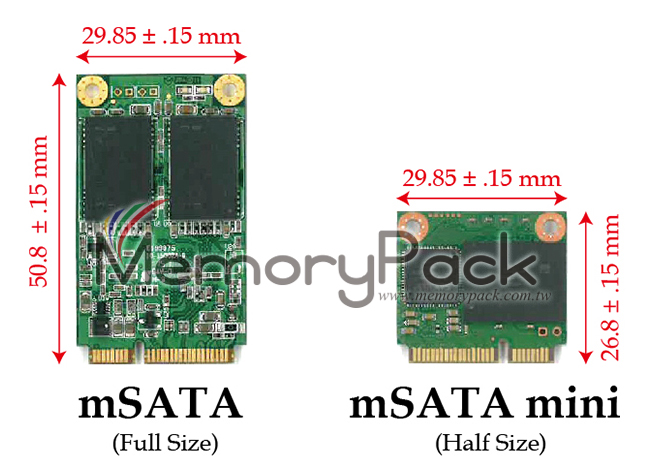
mSATA (Mini-SATA):
Shape: Shorter and wider (resembles a small business card).
Standard Size: Almost always 50.8 mm x 29.85 mm.
Connector: Uses a 52-pin "Mini-PCIe style" connector.
M.2 (formerly NGFF):
Shape: Narrow and rectangular (resembles a stick of gum).
Variable Sizes: Comes in different lengths (e.g., 2242, 2260, 2280 is the most common). The "22" refers to width in mm, and "80" refers to length.
mSATA:
Protocol: Restricted to SATA only.
Speed Cap: Maximum of 560MB/S. It hits a "speed ceiling" early.
M.2:
Protocols: Can support both SATA and NVMe (PCIe).
Speed Cap: M.2 NVMe drives (PCIe 4.0/5.0) can reach speeds over 7,000-10,000MB/s. It is significantly faster than any mSATA drive.
mSATA: Uses a single standardized connector. While it looks like a Mini-PCIe slot (often found in laptops for Wi-Fi cards), they are usually not electrically compatible unless the motherboard specifically supports "mSATA."
M.2: Uses a "Keying" system to prevent the wrong drive from being inserted:
B Key / M Key: M.2 SATA drives often have two notches (B+M).
M Key: High-speed NVMe drives usually have one notch (M Key).
References:
https://www.oscoo.com/news/what-are-the-differences-between-m-2-and-msata-ssd-form-factors/
https://www.crucial.com/support/articles-faq-ssd/msata-m2-ssds-overview?srsltid=AfmBOooPx-9H8w_HhpO_HT4IK-mEQahQ7mbzVF_l55rhF2Jo_OEqECzU
https://en.wikipedia.org/wiki/M.2
https://en.wikipedia.org/wiki/SATA#Mini-SATA_.28mSATA.29


